











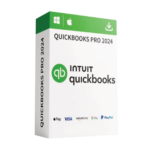
Description
Pay once. Run your books on your own PC for years.
QuickBooks Desktop Pro 2024 is the accounting software millions of small businesses know: invoices, bills, bank reconciliation, inventory and reports in one Windows app. It’s a one-time purchase with no monthly bill, and your company file stays on your own computer.
- Lifetime licenseOne payment, no renewals
- USA or Canada versionPick your country at checkout
- Windows onlyWindows 10 (64-bit) and 11
What you’re buying, line by line
No surprises after checkout. Here’s what this edition does, and what it doesn’t.
Included 8 tools
- ✓
Invoices, estimates & sales receiptsSend professional invoices, turn estimates into invoices in one click, and see who owes you what.
- ✓
Bank feeds & reconciliationDownload bank and credit card transactions, match them, and reconcile in minutes instead of hours.
- ✓
Bills & purchase ordersTrack what you owe and when it’s due, raise purchase orders, and pay bills on time.
- ✓
Expense trackingEvery expense recorded and categorized, ready for tax time.
- ✓
Inventory trackingFollow stock levels and item costs so you know what’s selling and when to reorder.
- ✓
Job and customer trackingSee income and costs by customer or job to find out which work pays best.
- ✓
Sales tax & 1099 trackingKeep track of sales tax collected and payments to contractors.
- ✓
Ready-made financial reportsProfit & Loss, Balance Sheet, cash flow, A/R aging and more, ready for your accountant or bank.
Not included 3 items
- ✕
PayrollThis version does not include the QuickBooks Payroll system: no paychecks, payroll tax filing or direct deposit.
- ✕
Mac versionIt installs on Windows only and won’t run on macOS, Get Mac version from here.
- ✕
Online accessIt’s desktop software, not QuickBooks Online. You use it on your PC, not in a browser.
Have employees? Pay them through a separate payroll service, then record the totals in QuickBooks with a journal entry. Your books stay complete.
Desktop or subscription: why owners choose Pro 2024
QuickBooks Online charges you every month for as long as you use it. Pro 2024 doesn’t.
- You pay once
- No monthly fees and no price increases at renewal time. The money you’d spend on a subscription stays in your business.
- Your data stays with you
- Your company file is saved on your own PC, not on someone else’s server, and you decide where your backups go.
- It’s fast
- It runs locally, so reports and searches open instantly, even with years of history in the file.
- It works offline
- You only need the internet for activation, updates and bank downloads. Everything else works without a connection.
- Your accountant knows it
- QuickBooks Desktop is a standard among bookkeepers and accountants, so handing over your books is easy.
A month of bookkeeping, done in four short sessions
This is what running your books looks like once QuickBooks is set up.
-
Week1
Send your invoices
Pick the customer and items from your saved lists, and the invoice is ready. Overdue customers are listed in one report, so you know exactly who to call.
-
Week2
Match the bank
Download your transactions and approve the matches. Anything that doesn’t line up stands out right away.
-
Week3
Pay bills and restock
See every bill that’s due, pay the ones that matter, and raise purchase orders for items running low.
-
Week4
Know your numbers
Run your Profit & Loss and know whether the month made money. In seconds, not a weekend of spreadsheets.
Is Pro the right edition for you?
Pick the QuickBooks that matches your business, and you’ll never pay for features you don’t use.
- Pro 2024
- For small businesses and freelancers on Windows with 1 to 3 users. Everything you need for everyday accounting. You’re on this page.
- Enterprise 24.0
- For growing companies with bigger teams, large inventories and industry-specific needs. See QuickBooks Enterprise 24.0
- Pro 2024 for Mac
- For businesses that work on a Mac instead of Windows. See QuickBooks for Mac
Getting started
- Choose USA or CanadaPick the version that matches the country your company files taxes in.
- Check your emailYour license key and download instructions arrive right after payment.
- Install and activateFollow the guide. If you get stuck, reply to your order email and we’ll help.
System requirements
- System
- Windows 11 or Windows 10 (64-bit)
- Processor
- 2.4 GHz or faster
- Memory
- 8 GB RAM, 16 GB recommended
- Disk
- 2.5 GB, plus space for company files
- Internet
- For download, activation, updates and bank feeds
- Mac
- Not supported – Get Mac version from here.
- Payroll
- Not included
Questions before you buy
Does this version include payroll?
No. QuickBooks Desktop Pro 2024 is sold here without the Payroll system, so you can’t run paychecks, file payroll taxes or send direct deposits from it. Use a separate payroll service and record the totals in QuickBooks.
Is this a subscription?
No. It’s a lifetime license: you pay once and keep using QuickBooks Desktop Pro 2024, with no monthly or yearly fees.
Should I choose the USA or the Canada version?
Choose the country your business is registered and files taxes in. Each version uses that country’s sales tax setup and formats.
Does it work on a Mac?
No. Pro 2024 is Windows software. If you work on a Mac, choose QuickBooks Desktop Pro 2024 for Mac instead.
How many people can use it?
QuickBooks Pro supports up to 3 users working in the same company file. Each person needs their own license.
Can I open my files from an older QuickBooks version?
Yes. Pro 2024 opens company files from earlier QuickBooks Desktop versions and updates them, so you keep all your history. Back up the file first.
How fast do I get my key?
Your key and download instructions are sent by email as soon as your payment is confirmed. If activation doesn’t work, reply to your order email and we’ll walk you through it.
Stop paying every month for your accounting.
Choose your USA or Canada version and add QuickBooks Desktop Pro 2024 to your cart. Your key arrives by email, and we’re here if you need help activating it.